Short answer: pick Neon if you want a lean, serverless Postgres that scales to zero and gives you real database branching for cheap preview environments. Pick Supabase if you want Postgres plus a whole backend — auth, storage, realtime, and auto-generated APIs — in one dashboard. They both sell "managed Postgres," but they're solving different problems, and the right choice usually comes down to whether you want a database or a backend.
We run TechRiseUps on Postgres with Supabase, so this isn't a spec-sheet comparison — it's where each one actually earns its keep, what the bills really look like in 2026, and the gotchas nobody puts on the pricing page.
One bit of context that matters before you commit: Neon is now part of Databricks (acquired in 2025), which has pushed it hard toward AI/agent workloads and ephemeral databases. Supabase stayed independent and keeps expanding the "Firebase alternative, but Postgres" story. That shapes where each is heading.
The short answer
| Neon | Supabase | |
|---|---|---|
| What it is | Serverless Postgres (database only) | Postgres + full backend (auth, storage, realtime, APIs) |
| Pricing model | Usage-based (compute-hours + storage) | Flat tiers + overage |
| Paid entry | $19/mo (Launch) | $25/mo (Pro) |
| Free tier | 10 projects, 0.5 GB/project, scale-to-zero | 500 MB DB, 2 projects, pauses after 7 days idle |
| Scale to zero | Yes — suspends idle compute | No — compute runs continuously |
| Branching | Full copy-on-write data branches | Preview branches (schema-focused) |
| Best for | Lean DB, preview envs, agent/serverless workloads | Full app backend without stitching services |
Neon: the database that disappears when you're not using it
Neon's whole pitch is serverless Postgres done properly. Two features make it genuinely different, not just marketing.
The first is scale-to-zero. Neon suspends your compute after about 5 minutes of inactivity and you stop paying for it entirely while it's idle (Bytebase). For a side project, a staging environment, or a database that only gets traffic in business hours, that's the difference between paying for 720 hours a month and paying for the 40 you actually use. Supabase doesn't do this on Postgres — you pick a compute size and it runs around the clock.
The second is copy-on-write branching. Neon lets you branch a database the way you branch git: a child branch shares unchanged data with its parent, so spinning up a full-data copy for a pull request is fast and cheap (simplyblock). If your team wants a real, data-complete database per preview deploy, this is the headline reason people move to Neon. Supabase has preview branches too, but they're focused on schema, not a full clone of your data.
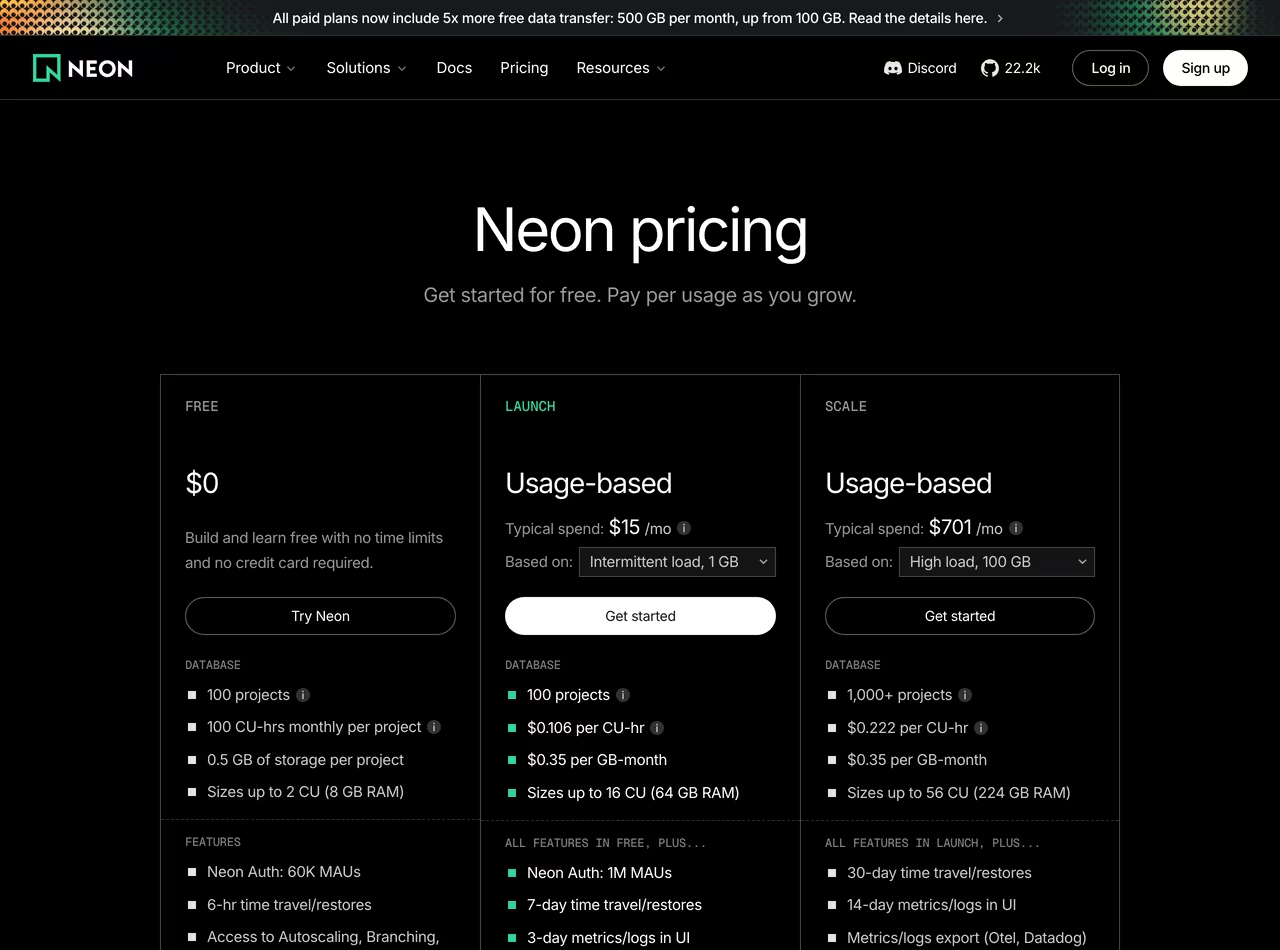 Neon pricing, June 2026
On pricing, Neon is usage-based: you pay for compute-unit-hours plus storage, and the plan tier mostly raises your included allowances and autoscaling ceiling. The Free plan is generous for development — up to 10 projects, ~191 compute-hours per project per month, 10 branches, 0.5 GB storage per project — and paid plans start at $19/month (CheckThat.ai). Autoscaling goes up to 8 compute units on the Launch and Scale tiers, with bigger fixed compute available higher up.
Where Neon frustrates people: it's just the database. No built-in auth, no object storage, no realtime, no instant REST API. You bring your own for all of that. If you wanted a backend, you'll be wiring up three or four other services around it.
Supabase: a backend in a box, with Postgres underneath
Supabase is the opposite philosophy. The database is real Postgres — not a NoSQL abstraction — but it ships inside a platform that also gives you authentication, file storage, realtime subscriptions, edge functions, and an auto-generated REST and GraphQL API over your tables. For a lot of apps, that means you go from empty project to "users can sign up and save data" without standing up a separate auth provider or storage bucket.
That's the reason we use it. When you're shipping an actual product, the auth + storage + row-level-security stack being one coherent thing saves real time. You write Postgres policies once and they protect your API, your realtime channels, and your storage in the same breath.
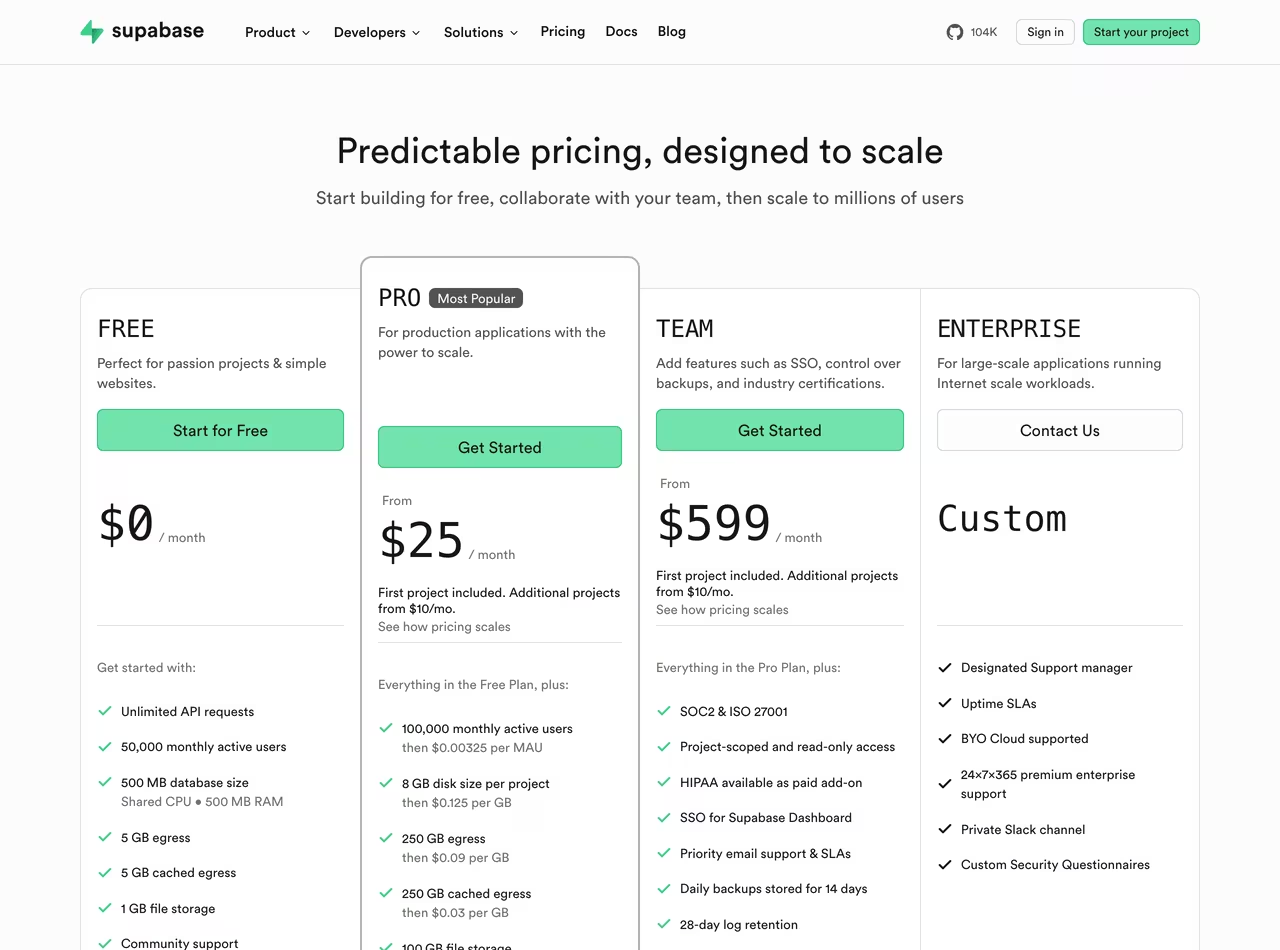 Supabase pricing, June 2026
Supabase pricing is flat and predictable: the Free tier gives you a 500 MB database, 1 GB file storage, and 50,000 monthly active auth users, but free projects pause after 7 days of no activity. The Pro tier is $25/month and includes a much larger resource allowance, with usage-based charges only above those limits (closefuture). For a team that wants to know roughly what the bill will be, that flatness is a feature.
Where Supabase frustrates people: the compute runs continuously (no scale-to-zero on Postgres), so an idle project still costs you, and at very large scale the all-in-one model can be less flexible than a database you've tuned and scaled on its own terms.
Which one should you actually pick?
- You want a database, not a backend — and you'll bring your own auth/storage: Neon.
- You want auth, storage, realtime, and an API without stitching services together: Supabase.
- You spin up lots of preview/ephemeral environments (per-PR databases, agent workloads): Neon, for the branching and scale-to-zero.
- You're building a typical web or mobile app and want to ship fast: Supabase.
- Cost predictability matters more than squeezing the last dollar: Supabase's flat tiers. You'd rather pay only for what you use: Neon's usage model.
- You're on the Databricks/AI data stack: Neon is increasingly the native fit.
A pattern worth naming: plenty of teams use both. Supabase for the production app's backend, Neon for cheap, branchable databases in CI and previews. They're not mutually exclusive.
The pricing reality nobody prints
The sticker prices ($19 vs $25) barely matter. What matters is the shape of the bill.
Neon's usage model is cheapest when your load is spiky or part-time — scale-to-zero means an idle database is genuinely free of compute charges. But a busy, always-on production database can run up compute-hours fast, and a usage bill is harder to predict before the month ends.
Supabase's flat tier is the opposite trade: you pay for that compute whether you use it or not, but you know the number. The surprises come from overages — bandwidth, storage, or extra compute add-ons above your tier — so read the included allowances, not just the headline tier price (designrevision).
Rule of thumb: spiky/ephemeral workloads lean Neon on cost; steady production apps lean Supabase on predictability.
FAQ
Is Supabase better than Neon?
Neither is strictly better — they're different tools. Supabase is better if you want a full backend (auth, storage, realtime, APIs) with Postgres underneath. Neon is better if you want a lean, serverless Postgres with scale-to-zero and real data branching. For shipping a typical app fast, most people find Supabase more complete; for a pure database with serverless economics, Neon wins.
Is Neon cheaper than Supabase?
On the entry price, yes — Neon starts at $19/month versus Supabase's $25/month. But the real cost depends on usage. Neon's scale-to-zero makes idle and spiky workloads much cheaper, while Supabase's flat pricing is more predictable for steady, always-on production traffic.
Can Neon replace Supabase?
Only partly. Neon can replace the database layer, but not Supabase's auth, storage, realtime, and auto-generated APIs — you'd add those yourself with other services. If you only needed Postgres, Neon can absolutely replace it; if you relied on the wider backend, you'd be rebuilding several pieces.
Does Supabase use Neon?
No. Supabase runs its own managed Postgres infrastructure; it isn't built on Neon. They're independent companies — and as of 2025, Neon is owned by Databricks while Supabase remains independent.
Which has a better free tier?
It depends on your shape. Neon's free tier allows more projects (up to 10) and scales to zero, which suits many small or experimental databases. Supabase's free tier bundles a full backend (auth, storage, 50k MAUs) but limits you to 2 projects and pauses them after 7 idle days. For lots of tiny databases, Neon; for one small full app, Supabase.
The bottom line
This isn't really "which Postgres host is best" — it's "do you want a database or a backend?" Neon is the better database: serverless, scale-to-zero, branchable, and cheapest when your load is part-time. Supabase is the better backend: Postgres plus the auth, storage, and APIs that turn a database into a shippable app, at a price you can predict.
If you're starting a product and want momentum, begin with Supabase. If you want a lean database with serverless economics — or cheap, data-complete preview environments — reach for Neon. And if you're at any scale, there's no rule against using both.
Disclosure: some links may be affiliate links. We run TechRiseUps on Supabase/Postgres and only recommend tools we actually use. Pricing was accurate at the time of writing — check each vendor's site for current rates.
Some links may earn us a commission at no extra cost to you.

Waqas Ahmed Waseer
Waqas Ahmed Waseer is a developer and automation builder with 8+ years shipping production systems used by 100k+ people. He builds custom multi-tenant SaaS, AI automation (n8n, LLM workflows, WhatsApp bots) and hosting infrastructure (WHM/cPanel, CloudLinux) — and is the maker of WaSphere, FlowMaticX, and the WaseerHost hosting brand. 100+ projects delivered for SMBs, agencies and funded startups.