If you're building a Next.js app and you want the fewest surprises, pick Vercel. If you're shipping a static or content-heavy site and you care about a flat, predictable bill for your whole team, pick Netlify. That's the short answer, and for most people it holds. The longer answer is where the money hides, because the two platforms now price so differently that "which is cheaper" depends entirely on what you're hosting and how big your team is.
I've deployed on both, and in 2026 the gap is less about features and more about billing philosophy. Vercel charges per developer seat plus metered usage. Netlify went all-in on a single credit pool that every team member shares. Those two choices ripple through everything else.
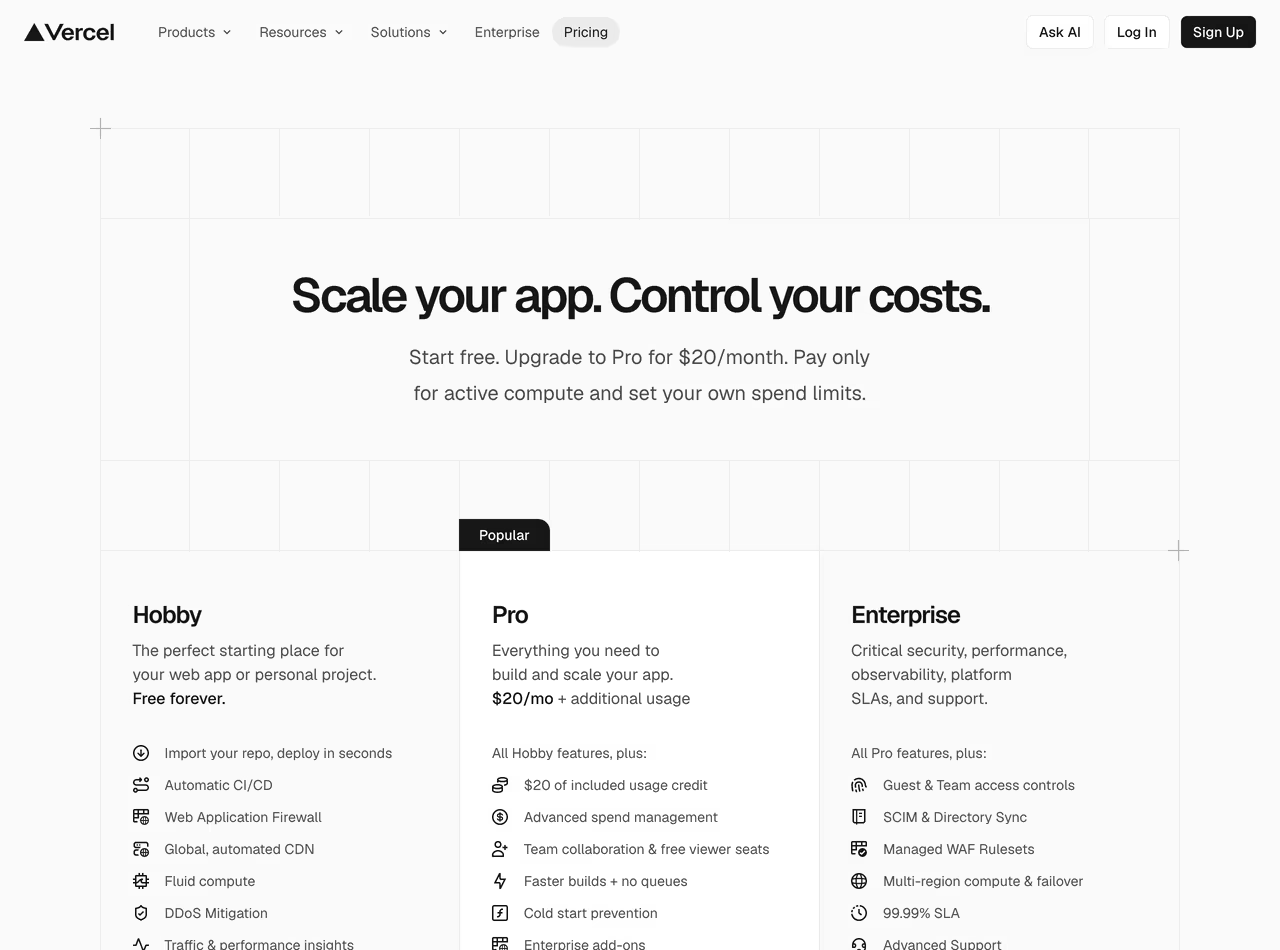 Vercel pricing, July 2026
Vercel vs Netlify at a glance
| Vercel | Netlify | |
|---|---|---|
| Entry price | Hobby: Free (personal/non-commercial) | Free: $0, Personal: $9/mo |
| Team plan | Pro: $20/user/month | Pro: $20/month flat, unlimited members |
| Bandwidth included | 100 GB (Hobby), 1 TB (Pro) | ~Tied to credits (300/3,000) |
| Bandwidth overage | $0.15/GB after 1 TB | 20 credits/GB (~$0.13/GB) |
| Build model | Active CPU metered ($0.128/hr on Pro) | 15 credits per production deploy (build time irrelevant) |
| Functions | 1M invocations free, then $0.60/1M | 10 credits per GB-hour compute |
| Edge requests | 10M/mo on Pro, then $2/1M | 2 credits per 10k web requests (~$0.01) |
| Best for | Next.js, full-stack, AI workloads | Static sites, big teams, predictable budgets |
Sources: Vercel pricing, Netlify pricing, Netlify credit docs.
Vercel: the Next.js home field
Vercel makes Next.js, so the integration is as tight as it gets. App Router, Server Components, Partial Prerendering, ISR — they ship the framework and the platform support on the same day. No adapters, no compatibility shims. If your stack is Next.js, this matters more than any pricing table, because the alternative is fighting your host every time the framework moves.
The free Hobby tier is genuinely usable for side projects: 100 GB of Fast Data Transfer, 1 million function invocations, 4 hours of Active CPU, 1 million edge requests, and 5,000 image transformations a month, per the official pricing page. The catch is the license — Hobby is non-commercial only. The moment you're making money, you're supposed to be on Pro.
Pro is $20 per developer seat per month, and each seat comes with $20 of usage credit. You get 1 TB of bandwidth, 10 million edge requests, and metered everything beyond that: $0.15/GB for extra bandwidth, $2 per million extra edge requests, $0.128/hour of Active CPU, $0.60 per million function calls. Viewer seats (people who just need read access) are free, which softens the per-seat sting a little.
That per-seat model is the thing to internalize. A solo dev pays $20. A five-person team pays $100/month before a single byte of overage. Vercel's own knowledge base comparison leans into the framework story and mostly stays quiet about the seat math, which tells you where the tension is.
Enterprise is custom-quoted: dedicated infrastructure, 99.99% uptime SLA, SSO/SAML, audit logs, priority support. You talk to sales, you sign a contract, you stop reading pricing pages.
On raw performance, independent 2026 testing keeps Vercel slightly ahead. The tech-insider benchmark roundup cites Vercel at roughly 70ms TTFB versus Netlify's ~90ms, helped by a much larger edge footprint — 126 points of presence against Netlify's smaller core CDN. For a server-rendered Next.js app, that's a real, measurable edge. For a static site behind a CDN, you'll struggle to feel it.
Netlify: flat-rate, credit-pooled, team-friendly
Netlify rebuilt its pricing in 2026 around a single unit: the credit. One pool, shared across your whole team, spent on deploys, bandwidth, compute, and requests. It's a cleaner mental model than Vercel's grab-bag of meters once it clicks, and the credit-based pricing docs lay out the rates plainly.
Free gives you 300 credits a month with a hard ceiling — no auto-recharge, no overage. When you run out, the site pauses until next month or until you upgrade. That's a deliberate "you will never get a surprise bill" design, and it's great for portfolios and small static sites. It's frustrating for preview-heavy dev loops, because every production deploy eats 15 credits.
Personal at $9/month bumps you to 1,000 credits and unlocks auto-recharge (500 credits for $5). Pro is the headline: $20/month flat, 3,000 credits, and — the big 2026 change — unlimited team members included. No per-seat fee. Per Netlify's April 2026 pricing changelog, you can invite your whole team onto one $20 subscription. For a team of five, that's $20 versus Vercel's $100. That number alone wins a lot of arguments.
Here's the part people miss: Netlify killed the old "build minutes" metric. In the credit model, a deploy costs 15 credits whether the build took 30 seconds or 10 minutes. Failed builds and rollbacks to a previous deploy cost nothing. So if you have slow, heavy builds, Netlify's flat-per-deploy pricing can quietly save you money — you're not metered on CPU time the way you are on Vercel.
The credit rates, converted: bandwidth is 20 credits/GB (about $0.13/GB), compute is 10 credits per GB-hour ($0.07), web requests are 2 credits per 10k ($0.01 per 10k), production deploys are 15 credits. Netlify also still ships the things Vercel makes you bolt on yourself — native form handling, identity, A/B testing — which the FocusReactive comparison calls out as a genuine DX win for content sites.
Enterprise is, again, call-sales territory: custom credits, compliance, SSO, the usual.
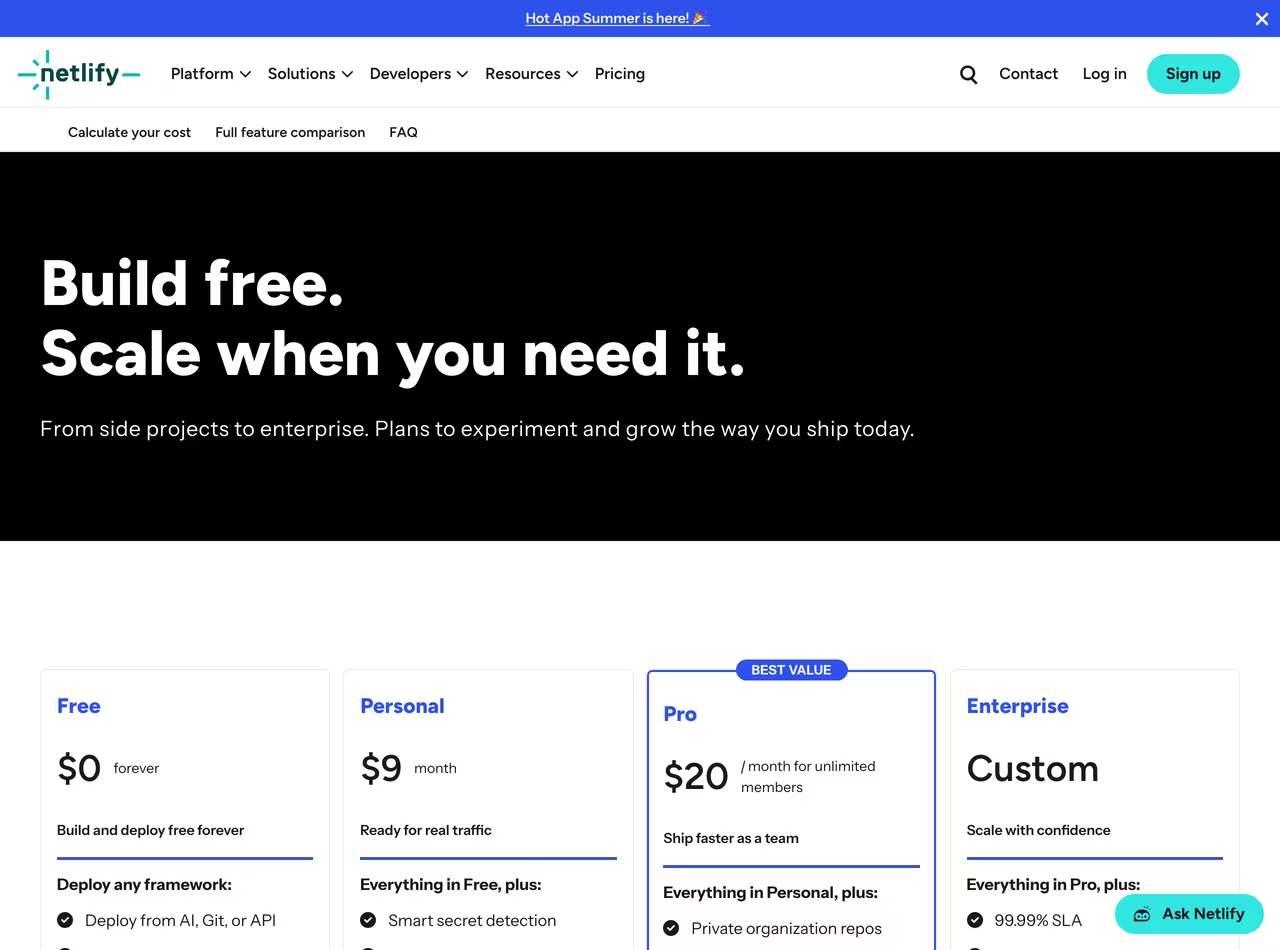 Netlify pricing, July 2026
Which one should you actually pick?
Building a Next.js app? Vercel. This isn't close. First-party framework support, faster server-rendered TTFB, and zero adapter friction. You can run Next.js on Netlify, just as you can on a VPS or a PaaS like Railway (more on that below), but you're choosing the harder path on purpose.
Shipping a static site — Astro, Hugo, plain HTML, a docs site? Netlify. The free tier is forgiving, the build-time-doesn't-matter pricing suits heavy static generation, and form handling comes free. Vercel works fine here too; it's just not where its advantages show up.
Running a team of 3+? Netlify, on price alone. $20 flat with unlimited seats versus $20 per seat is a real difference, and it compounds every month. Unless your team specifically needs Vercel's Next.js depth, the flat rate is hard to argue with.
On a tight budget / hobby project? Netlify's Free tier if you want a guaranteed-zero bill with a hard cap. Vercel's Hobby if your project is non-commercial and you want more raw included resources (100 GB bandwidth, 1M functions). Read the Hobby license before you ship anything commercial.
Bandwidth-heavy site (media, big assets)? Run the math both ways. Netlify's ~$0.13/GB is marginally cheaper than Vercel's $0.15/GB, but Vercel includes a full 1 TB on Pro before metering starts. For a site pushing several TB a month, neither is "the cheap one" — you should be pricing a real CDN to tame bandwidth and egress or considering Enterprise.
The real-world cost: where the bill bites
Free tiers and headline prices lie a little. Here's where actual money leaks.
Vercel's seat multiplication. The biggest gotcha isn't usage — it's people. Every developer who needs deploy access is another $20/month. A growing team can hit $200–$400/month in seats before usage overages even enter the picture. The makerkit teardown and other 2026 cost breakdowns hammer this point: Vercel's bill scales with headcount, not just traffic.
Vercel's metered everything. Image transformations, ISR reads/writes, edge requests, Active CPU — each has its own meter and its own overage rate. The $20 usage credit per seat absorbs a lot for small projects, but a busy app blows through it and you're paying $0.15/GB bandwidth, $2/million edge requests, and per-transformation image fees on top. It's predictable if you watch your dashboard; it's a nasty month if you don't.
Netlify's hard-cap surprise. The Free plan doesn't bill you extra — it stops your site. If you're relying on free credits and you ship a few deploys plus a traffic spike, you can run dry mid-month and your site pauses. That's arguably worse than a small overage charge if it's a site that matters. Upgrade to Personal or Pro and turn auto-recharge on if uptime is non-negotiable.
Netlify's deploy credits in CI-heavy workflows. Fifteen credits per production deploy sounds trivial until you're auto-deploying to production on every merge. At 300 free credits, that's only 20 production deploys a month before bandwidth and compute even count. Teams that deploy constantly burn the free tier fast — though Pro's 3,000 credits gives you plenty of room.
My honest take: for a solo dev or small team on Next.js, Vercel's bill is fine and the DX is worth the premium. For anything content-shaped, or any team past three people, Netlify's flat pricing saves real money and the feature gap doesn't hurt you.
FAQ
Is Vercel better than Netlify?
For Next.js, yes — Vercel is better because it builds the framework and ships platform support in lockstep, and it posts faster server-rendered TTFB in independent 2026 benchmarks (~70ms vs ~90ms). For static sites, big teams, or budget-sensitive projects, Netlify is the better pick. "Better" depends entirely on your stack and team size.
Is Netlify cheaper than Vercel?
Usually, for teams — yes. Netlify Pro is $20/month flat with unlimited members, while Vercel Pro is $20 per developer seat. A five-person team pays $20 on Netlify versus $100 on Vercel. For a solo developer the base price is nearly identical ($20 vs $20), and per-GB bandwidth is close ($0.13 Netlify vs $0.15 Vercel). The savings come from seats, not usage.
Can I host Next.js on Netlify?
Yes. Netlify supports Next.js, including SSR and a chunk of the App Router, through its own adapter. It works for many apps. But you trade away Vercel's same-day framework support and best-in-class Next.js performance, and the newest Next.js features can lag. If Next.js is central to your product, Vercel is the lower-friction home.
Is Vercel worth it?
If you're on Next.js and value a clean, fast deployment workflow, yes — the framework integration and edge performance justify the price for a solo dev or small team. If you're a larger team or shipping static content, the per-seat cost makes Vercel hard to justify when Netlify gives you flat pricing and unlimited seats for the same $20.
What happens when I hit the free tier limit?
They behave oppositely. Vercel's Hobby plan is non-commercial and meters generously but is meant for side projects, not production businesses. Netlify's Free plan has a hard 300-credit cap with no auto-recharge — your site pauses when credits run out until the next cycle or an upgrade. If uptime matters, don't run production on Netlify Free.
Bottom line
Pick Vercel if you live in Next.js, want the fastest server-rendered performance, and you're a solo dev or small team where per-seat pricing doesn't sting. Pick Netlify if you're shipping static or content sites, running a team of three or more, or you just want one flat $20 bill with unlimited seats and predictable credits. Both are excellent — they've just optimized for different customers, and in 2026 the deciding factor is usually your team size and your framework, not a feature checklist.
Affiliate disclosure: TechRiseUps may earn a commission if you sign up through links on this page, at no extra cost to you. Pricing reflects publicly listed rates as of July 2026 and may change — always confirm on the official Vercel and Netlify pricing pages before you commit.
Some links may earn us a commission at no extra cost to you.

Waqas Ahmed Waseer
Waqas Ahmed Waseer is a developer and automation builder with 8+ years shipping production systems used by 100k+ people. He builds custom multi-tenant SaaS, AI automation (n8n, LLM workflows, WhatsApp bots) and hosting infrastructure (WHM/cPanel, CloudLinux) — and is the maker of WaSphere, FlowMaticX, and the WaseerHost hosting brand. 100+ projects delivered for SMBs, agencies and funded startups.