If you want the short answer: pick Railway if you hate babysitting bills and want apps that stay warm without paying for a fixed box, and pick Render if you want a predictable per-service price tag and a genuinely free tier to start on. Railway charges you per second for exactly what your container burns. Render hands you a menu of flat-priced instances plus a free hobby tier that sleeps. Both are good. The "right" one depends almost entirely on whether your traffic is steady or spiky, and whether you'd rather guess at a usage bill or read a fixed number off a plan card.
I've shipped side projects and small production apps on both. This is the comparison I wish I'd had before I picked.
Railway vs Render at a glance
| Railway | Render | |
|---|---|---|
| Pricing model | Usage-based, billed per second | Flat per-service plans + plan fee |
| Entry price | $5/mo Hobby (includes $5 usage) | Free Hobby tier, then $7/mo Starter |
| Free tier | $5 trial (30 days), then $1/mo credit, no card | Real free tier (web, static, Postgres) |
| Apps sleep? | No, always-on | Free web services sleep after 15 min |
| Databases | Postgres, MySQL, Redis, MongoDB | Postgres, Key Value (Redis-compatible) |
| Cron jobs | Yes, paid plans | Yes, first-class service type |
| Background workers | Yes (any service) | Yes, dedicated worker type |
| Static sites | Possible, not a focus | Free, unlimited, a core feature |
| Autoscale | Vertical/replica scaling | CPU/memory autoscale on higher plans |
| Regions | US, EU, Asia | US East, US West, EU, Singapore |
| Best for | Spiky traffic, multi-service apps | Steady traffic, predictable budgets |
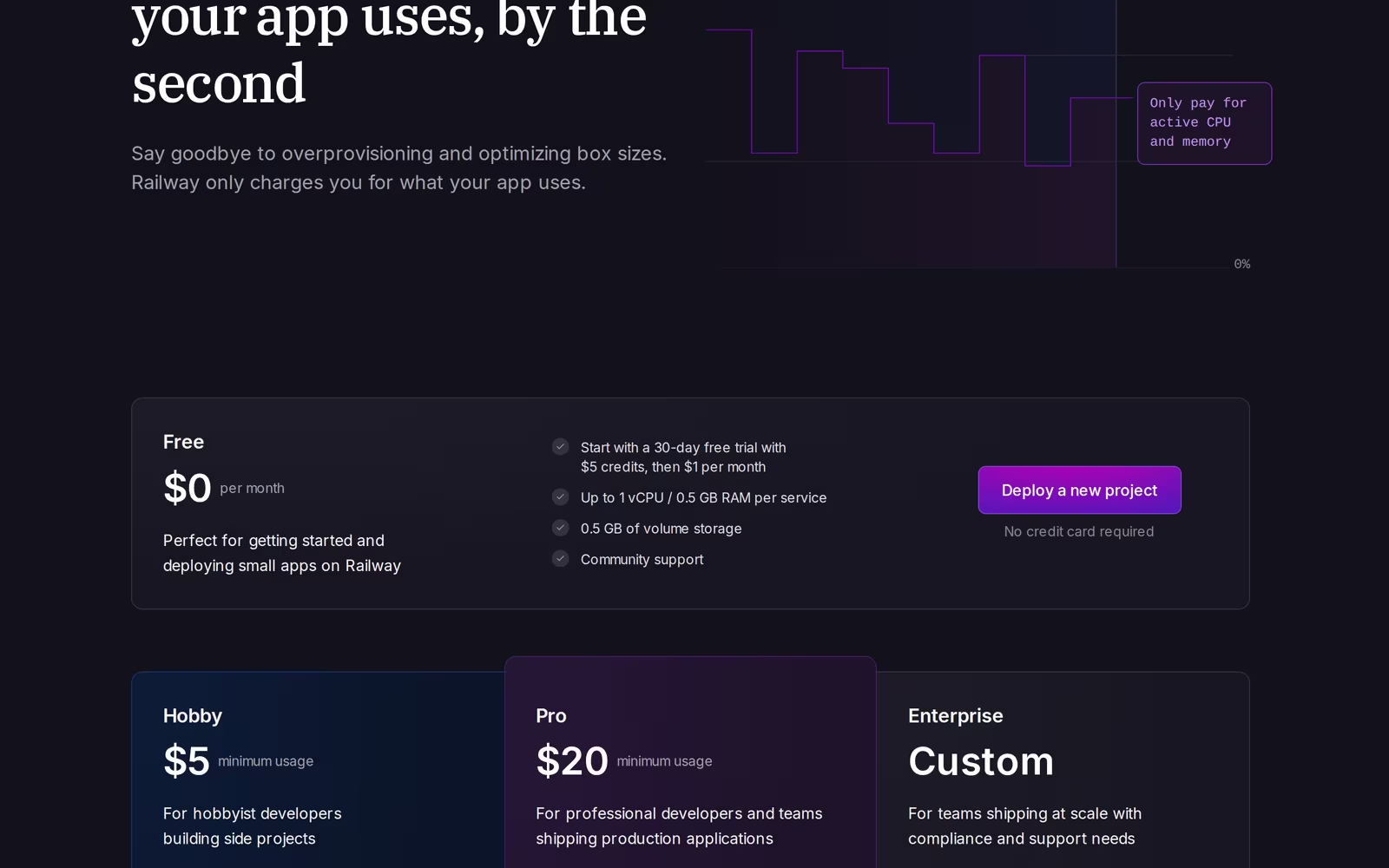 Railway pricing, July 2026
Railway: pay for the seconds you actually use
Railway's whole pitch is that you stop renting a fixed box and start paying for consumption. Your service runs, it sips CPU and RAM, and the meter ticks per second.
Here are the real rates, straight from Railway's docs as of July 2026: CPU is $20 per vCPU per month, which works out to $0.000463 per vCPU per minute. RAM is $10 per GB per month. Volume storage is $0.15 per GB per month. Network egress is $0.05 per GB (Railway Pricing docs).
The plans wrap credits around those rates. Hobby is $5/month and includes $5 of resource usage. So if your app is tiny and uses less than $5 of compute in a month, the plan fee covers it and you pay nothing extra. Go over, and you pay the delta at those per-second rates. Pro is $20/month (a $20 minimum that includes $20 of usage) and now bundles unlimited workspace seats, with the same overage rates (Railway Pricing).
Railway's free option is thin but real. New accounts get a 30-day trial with $5 of credit and no credit card; when it ends you drop to the Free plan, which grants $1 of usage credit a month (it doesn't roll over) and caps you at 1 vCPU / 0.5 GB RAM per service. That's enough to keep one tiny service alive, not to run a real app with a database (Railway Pricing; Railway free-trial docs).
What I like: Railway services don't sleep. A low-traffic app stays warm, so there's no cold-start penalty when someone finally hits it. The developer experience is the other big draw. It auto-detects your stack (Node, Python, Go, whatever) through its build system, spins up Postgres, MySQL, Redis, or MongoDB from one-click templates, and the dashboard updates in real time as you wire services together (Northflank). You connect a repo, it figures out the build, you get a URL. For multi-service apps, an API plus a worker plus a database plus a Redis cache, composing them on Railway is widely reported to feel less fiddly than most alternatives.
The flip side is the bill. Usage-based pricing is wonderful until your app gets popular and you're squinting at a graph trying to work out why this month cost more than last. A small Node app might run $2 to $5/month. A high-traffic one can land in the $20 to $50 range, and there's no flat ceiling telling you in advance (The Software Scout).
Render: a price tag you can read before you commit
Render takes the opposite approach. You pick an instance size, you see the monthly price, and that's the number, regardless of whether the app is slammed or idle.
The free tier is the real headline, and it's still here in 2026. You get free web services with 750 instance hours a month, unlimited free static site hosting, and a free Postgres database. The catches: free web services spin down after 15 minutes of inactivity, so the next request pays a cold start that Render's own docs put at about a minute to spin back up, and the free Postgres database is a 1 GB instance that expires 30 days after you create it (Render free-tier docs).
Paid web services start at $7/month for the Starter instance and scale up through Standard at $25/month, Pro at $85/month, and beyond into the Pro Plus, Pro Max, and Pro Ultra tiers for memory-heavy work (Render Pricing; Costbench). Managed Postgres starts around $6 to $7/month for the smallest paid Basic instance, and Render's newer flexible plans let you tune CPU and RAM independently of storage (Kuberns).
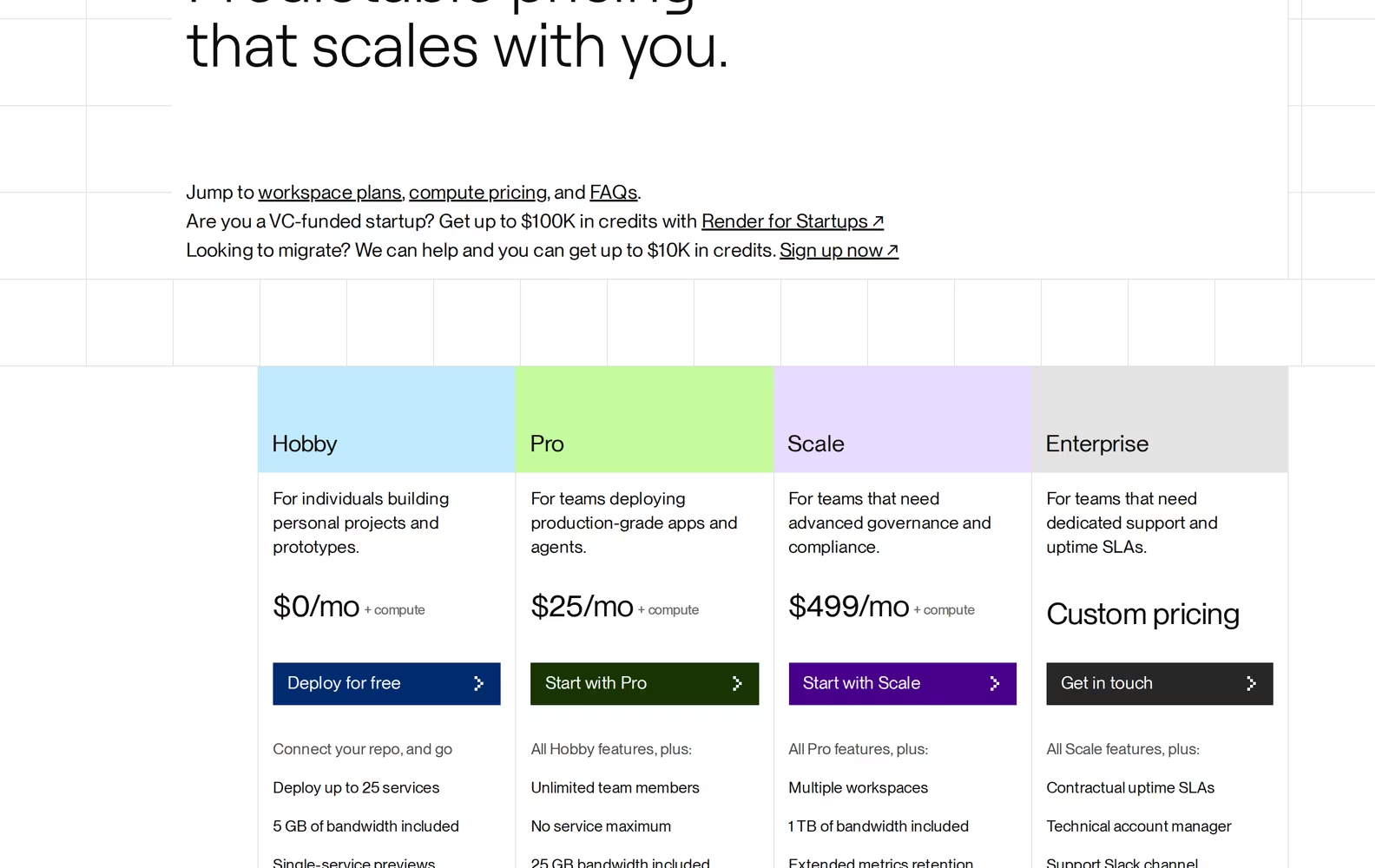 Render pricing, July 2026
Render treats cron jobs, background workers, and private services as first-class citizens. You don't hack a cron into a web service, you create a cron job service and Render runs it on schedule (Northflank). Static sites are a core feature, not an afterthought, so a marketing page or docs site costs you nothing. On the scaling side, Render offers CPU and memory-based autoscaling on higher plans, and multi-region across US East, US West, Europe, and Singapore (Encore).
The honest downside: those flat plans can feel expensive once you add things up. A web service, a database, and a worker each carry their own line item, and a couple of Standard-tier services plus a paid database climbs past Railway's likely cost for the same low-traffic workload. The free tier's sleeping behavior also rules it out for anything where a cold start would embarrass you in front of a real user.
Which to pick, by use case
Hobby or side project. If you can tolerate cold starts, Render's free tier wins outright. Free static hosting, free web services, a free database to learn on, no credit card pressure. If cold starts bug you and you want the thing to stay warm, Railway's $5 Hobby plan keeps a small app always-on for less than a coffee.
Startup app heading to production. Render, if you value a predictable bill you can put in a spreadsheet. A $7 or $25 web service plus a $6 to $7 database is a known quantity. Railway, if your traffic is bursty and you'd rather not pay for idle capacity overnight.
Database-heavy work. Toss-up that leans on flavor. Railway supports Postgres, MySQL, Redis, and MongoDB from templates, so if you need MySQL or Mongo without running your own container, it's the easier ride (Northflank). Render focuses on Postgres and a Redis-compatible Key Value store, with daily backups and point-in-time recovery on higher tiers, which is the better story if Postgres is all you need and you care about backup tooling.
Background jobs and cron. Render edges this. Cron jobs and background workers are dedicated service types, so scheduling is clean and obvious. Railway runs cron and workers fine, but cron lives on paid plans and the setup is a touch more manual (Northflank).
Tightest budget. Render if your app can sleep, because free is free. Railway if it can't, because $5/month for an always-on small app beats Render's $7 Starter, and you skip the cold start.
The real-cost reality
Sticker prices lie a little in both directions, so let me ground it.
Say you're running a small API with a Postgres database, low but steady traffic. On Render, that's realistically a $7 Starter web service plus a $7 Basic Postgres, so roughly $14/month, fixed, no surprises. On Railway, the same workload, a small container that's barely working plus a small Postgres, often lands in the $5 to $10 range because you're paying for actual low consumption, and the Hobby plan's $5 credit absorbs part of it (Railway docs; Encore).
Now flip it. A service that's genuinely busy, lots of CPU, steady RAM, real egress. Railway's meter keeps climbing with usage and can pass $20 to $50 with no built-in cap (The Software Scout). Render's $25 Standard or $85 Pro is a hard number no matter how hard you hammer it, which is exactly why heavier or spikier production apps sometimes feel safer on a flat plan.
The pattern: Railway tends to win on cost for small, idle, or bursty apps. Render tends to win on cost predictability, and sometimes raw cost, once an app is busy enough that a fixed plan is cheaper than a climbing meter. Neither is "the cheap one." They're cheap at different points on the curve.
One more reality check that applies to both: as Encore's own comparison admits, if your current bill is reasonable and your app runs fine, the smartest move is usually to stay put rather than chase a migration (Encore).
FAQ
Is Railway cheaper than Render?
For small, low-traffic, or idle apps, usually yes. Railway bills per second, so an app that mostly sits quiet costs very little, and the $5 Hobby plan often covers it entirely. Once an app is busy and steady, Render's flat plans can come out cheaper because Railway's meter keeps climbing while Render's price is fixed. Cheaper depends on your traffic shape, not the platform.
Is Render better than Railway?
Better at different things. Render is better if you want a predictable monthly bill, free static site hosting, a real free tier, and clean first-class cron and worker services. Railway is better if you want apps that never sleep, usage-based pricing that scales down when idle, and easy support for MySQL and MongoDB alongside Postgres. There's no universal winner here.
Does Railway have a free tier?
Barely. New accounts get a 30-day trial with $5 of credit and no credit card. When it expires you fall back to the Free plan, which gives $1 of usage credit a month (no rollover) and limits you to 1 vCPU / 0.5 GB RAM, enough for one tiny always-on service but not a real app with a database (Railway Pricing). The cheapest properly usable option is the $5/month Hobby plan, which includes $5 of usage. If you need a genuinely usable free tier, Render's is the one to reach for.
Is Railway good for production?
Yes, with eyes open. Railway runs production apps reliably, keeps services warm with no cold starts, and supports replicas and vertical scaling. The thing to watch is the bill, since usage-based pricing has no built-in cap, so you'll want budget alerts and an eye on the metrics. For predictable, steady production traffic, some teams still prefer Render's flat pricing simply because the number doesn't move.
Does Render's free tier sleep?
Yes. Free web services spin down after 15 minutes of inactivity and take about a minute to spin back up on the next request (Render free-tier docs). The free Postgres database also expires 30 days after it's created. Static sites on the free tier don't sleep. If cold starts are a dealbreaker, either move to a paid Render instance or use Railway, where services stay always-on.
Bottom line
Pick Railway if your traffic is spiky or light, you want zero cold starts, and you'd rather pay for what you use, especially for multi-service apps with mixed databases. Pick Render if you want a free tier to start on, a fixed monthly price you can plan around, and clean cron, worker, and static-site support. Try the one that matches your traffic shape, watch the first real bill, and switch only if the numbers actually hurt.
Affiliate disclosure: TechRiseUps may earn a commission if you sign up through links on this page. It doesn't change what you pay, and it doesn't change our take. Pricing is accurate as of July 2026 and pulled from each provider's official pages, but check the live pricing before you commit, since both platforms adjust tiers over time.
Some links may earn us a commission at no extra cost to you.

Waqas Ahmed Waseer
Waqas Ahmed Waseer is a developer and automation builder with 8+ years shipping production systems used by 100k+ people. He builds custom multi-tenant SaaS, AI automation (n8n, LLM workflows, WhatsApp bots) and hosting infrastructure (WHM/cPanel, CloudLinux) — and is the maker of WaSphere, FlowMaticX, and the WaseerHost hosting brand. 100+ projects delivered for SMBs, agencies and funded startups.