If you want the short answer: pick Cursor if you live inside an AI agent all day and want it planning, editing across files, and running your tests with minimal hand-holding. Pick GitHub Copilot if you already work in VS Code or JetBrains, want to spend less, and just need smart autocomplete plus a capable agent that stays out of your way. Most solo devs on a budget should start with Copilot's free tier or its $10 Pro plan; heavy agent users who burn through tokens will get more done in Cursor and won't mind paying double for it.
That's the version for people skimming. The longer version matters, because in 2026 both tools changed how they charge you, and the sticker price no longer tells you what you'll actually spend.
For the full four-way comparison including Windsurf and Claude Code, see our 2026 showdown; this article stays tightly focused on the Cursor-versus-Copilot decision.
Cursor vs GitHub Copilot at a glance
| Cursor | GitHub Copilot | |
|---|---|---|
| Entry price | $20/mo (Pro) | Free, or $10/mo (Pro) |
| Higher tiers | Pro+ $60, Ultra $200 | Pro+ $39, Max $100, Business $19/user |
| Billing model | Usage credits included, on-demand after | AI Credits (1 credit = $0.01), usage-based since June 1, 2026 |
| Models | GPT-5 series, Claude Opus/Sonnet, Gemini 3 Pro, Grok Code | GPT-5 series, Claude Opus/Sonnet/Haiku, Gemini 3, plus GitHub's own Raptor |
| Autocomplete | Cursor Tab (proprietary Fusion model), cross-file predictions | Code completions, unlimited on every paid plan |
| Agent mode | Composer 2 with autonomy slider, cloud agents | Coding agent, local + GitHub-native automation |
| Multi-file editing | Aggressive, repo-indexed, spans thousands of lines | Conservative, framework-idiomatic |
| IDE support | Standalone editor (VS Code fork) | VS Code, JetBrains, Visual Studio, Neovim, Xcode |
| Best for | Power users, agent-heavy workflows | GitHub/VS Code teams, budget-conscious devs |
Prices and details from Cursor's pricing page and GitHub Copilot's plans page, both checked June 2026.
Cursor: an editor built around the agent
Cursor isn't a plugin. It's a fork of VS Code where the AI sits at the center instead of bolted onto the side. That design choice is the whole pitch, and it shows up in everything the tool does well.
What it's great at: codebase awareness. Cursor indexes your entire repo and actually understands how files relate to each other. Ask it to rename a concept that touches twelve files and it'll find all twelve, not the four that happened to be open. Its Tab completion (powered by an in-house model called Fusion) predicts your next edit, often in a different file than the one you're typing in. The first time it jumps you to the right spot three files away, it feels slightly uncanny.
The agent — Composer 2 — is where Cursor pulls ahead. It has an explicit autonomy slider, so you decide how much rope to give it. Crank it up and it'll plan a feature, write the code, run your tests, and iterate on failures without you tapping the keyboard. You can run agents locally or hand work off to parallel cloud agents. Tembo, a company that runs both tools side by side, calls Cursor the better pick "for power users and agentic workflows" — and that matches my experience. For end-to-end "build this whole thing" tasks, it's the stronger driver.
 Cursor pricing, June 2026
Where it frustrates: the bill. Cursor's plans bundle a pot of model usage, and once you drain it you're into on-demand billing or you wait for the next cycle. Pro is $20/month, Pro+ is $60, and Ultra is $200 (Cursor pricing). Those higher tiers don't exist for fun — heavy Composer 2 use compounds fast, and Tembo notes teams jumping from Pro to a bigger plan inside a quarter. The other friction is lock-in: it's a separate editor. If your team standardized on JetBrains or Visual Studio, switching everyone to a VS Code fork is a real ask. And because Cursor predicts aggressively, it occasionally rewrites code you didn't want touched. Great when it's right, annoying when it isn't.
GitHub Copilot: the safe default that got cheaper to start
Copilot took the opposite path. It augments the editor you already use rather than replacing it. In 2026 that means VS Code, JetBrains, Visual Studio, Neovim, and Xcode — six environments to Cursor's one.
What it's great at: reach and price-to-entry. The free tier gives you 2,000 code completions and 50 chat requests a month, which genuinely covers a lot of hobbyist and student work (GitHub Copilot plans). Pro is $10/month — half of Cursor's entry price — and Pro+ is $39, with a Max tier at $100 and Business at $19 per user. Code completions and next-edit suggestions stay unlimited on every paid plan and don't eat into your credit allowance, which is a meaningful detail I'll come back to. The model roster is huge: GPT-5 variants, Claude Opus and Sonnet, Gemini 3, plus GitHub's own Raptor model, all available across plans per GitHub's pricing docs.
Copilot's agent has caught up a lot. It can take an issue, open a PR, and run in GitHub-native automation — which, if your whole workflow already lives in GitHub, is a tighter loop than anything Cursor offers. DigitalOcean's 2026 review frames Copilot as the safer institutional choice for exactly this reason.
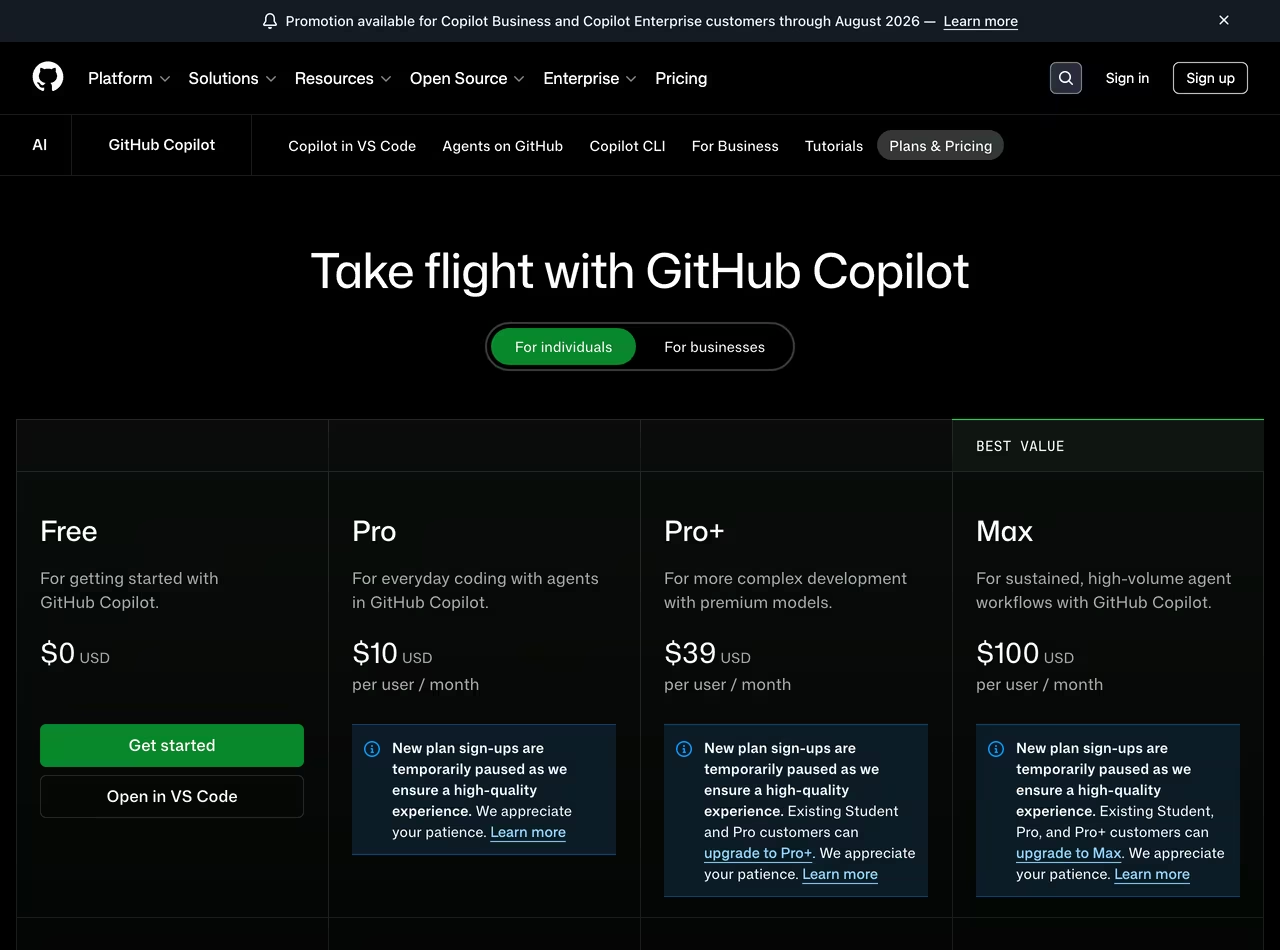 GitHub Copilot plans, June 2026
Where it frustrates: the new billing math, and the fact that its agent and multi-file editing are more cautious. On June 1, 2026, GitHub switched every plan to usage-based billing. Premium requests are gone; now you get a monthly pool of "AI Credits" where 1 credit equals $0.01, and every chat or agent action burns tokens metered against that pool (GitHub blog). Your Pro $10 buys you roughly $10 of credits, Pro+ buys ~$39, and so on. That's cleaner on paper. It also means a chatty week with a pricey model like Claude Opus can drain your allowance faster than the old flat "300 premium requests" ever did — which is exactly what set developers off when the change landed.
Which should you pick
Solo dev, just dipping in: Copilot Free. Two thousand completions a month costs nothing and the autocomplete is excellent. Upgrade to Copilot Pro at $10 when you start wanting real chat and agent help.
Budget-conscious but serious: Copilot Pro at $10. You get unlimited completions plus a credit pool for agent work, in whatever IDE you already use. It's the best dollar-for-dollar deal in this category.
Heavy agent user: Cursor, Pro+ or Ultra. If you're the kind of dev who says "go build the auth flow and come back when tests pass," Composer 2 and the autonomy slider are worth the premium. You'll spend $60–$200, but you'll ship features the agent owns end to end.
Team on the GitHub stack: Copilot Business at $19/user. Centralized billing, admin controls, budget caps, and it plugs straight into your PRs and Actions. The friction of rolling it out is near zero because nobody changes editors.
Enterprise: It's a wash on capability, so decide on governance. Copilot Enterprise gives you GitHub-native policy controls and audit trails; Cursor Enterprise gives you the more powerful agent and per-task model routing. If procurement already trusts GitHub, that inertia is hard to beat.
The real-world cost nobody quotes you
Here's the part the pricing tables hide. Both tools moved to consumption-based models in 2026, and consumption is unpredictable.
On Copilot, completions are free and unlimited — that's the good news, and it's a real advantage. The catch is everything else. Chat, agent runs, and multi-file edits all spend AI Credits metered by token count: input, output, and cached tokens all count (GitHub blog). Run a few agent sessions on Claude Opus and a $10 Pro plan's credit pool evaporates well before month end. After that, an org can configure things to either block further use or let you buy more at list rates. So your "$10 plan" is a $10 floor, not a ceiling, unless you cap it — and if you cap it, you get throttled in the last week of the month. Developers reacting to the change online summed it up bluntly: you can end up getting less for the same money.
Cursor has the same shape with different defaults. Tab completions are unlimited, but every agent request draws down your included usage pool based on which model handles it and how complex the prompt is. Cheap models cost fractions of a cent; running Opus through a big-context request costs real money. Auto mode helps — it picks the cheapest model that can handle a task to stretch your credits — but the moment you start manually reaching for the heavy models, or turn on MAX-mode extended context, the meter spins. Drain the pool and agent features stop until next cycle or until you pay on demand.
The honest takeaway: budget by usage pattern, not by sticker price. A completion-heavy dev who rarely uses the agent will be happy forever on Copilot Pro at $10. An agent-first dev will blow past any entry tier on either tool and should price-compare at the Pro+/Ultra level, where Cursor's $60 and Copilot's $39 are closer than the entry tiers suggest.
FAQ
Is Cursor better than Copilot?
For agent-driven, multi-file work — building a whole feature, refactoring across a large repo — Cursor is better. Its codebase indexing and Composer 2 agent are more capable and faster at autonomous tasks. For everyday autocomplete, IDE flexibility, and cost, Copilot is better. There's no universal winner; it depends on whether you're driving the AI or letting it drive.
Is Cursor worth it over Copilot?
If you'll actually use the agent heavily, yes — the extra $10/month at the entry tier (or the jump to Pro+/Ultra) pays for itself in shipped features. If you mostly want great tab-completion and occasional chat, no. You'd be paying double for power you won't touch, and Copilot's free or $10 tier does that job well.
Does Cursor use Copilot?
No. Cursor is a standalone editor (a VS Code fork) with its own autocomplete model (Fusion) and its own agent. It connects directly to model providers like OpenAI, Anthropic, Google, and xAI. It doesn't run on GitHub Copilot or share its backend.
Can I use Copilot inside Cursor?
Cursor is built on the VS Code codebase, so the GitHub Copilot extension can technically be installed, but it's redundant — Cursor ships its own autocomplete and agent, and running both fights for the same keybindings. Most people pick one. If you want Copilot specifically, just use it in real VS Code or JetBrains.
How much do Cursor and Copilot cost in 2026?
Cursor: Pro $20/mo, Pro+ $60/mo, Ultra $200/mo, Teams $40/user/mo (source). GitHub Copilot: Free, Pro $10/mo, Pro+ $39/mo, Max $100/mo, Business $19/user/mo (source). Both now bill model usage on top of (or within) those tiers, so heavy users may pay more than the base price.
Bottom line
Default to GitHub Copilot — start free, move to Pro at $10 — if you want the cheapest capable assistant in the IDE you already use. Step up to Cursor if you're an agent-first developer who wants the AI to own whole tasks and you don't flinch at $60–$200/month. The single most important thing to understand in 2026: both tools meter usage now, so your real cost tracks how hard you lean on the agent, not the number on the pricing page. Watch your credit pool for the first month, then pick the tier that fits your actual burn.
Disclosure: TechRiseUps may earn a commission from links in this article. It doesn't change our recommendation — we test these tools ourselves and call them as we see them.
Some links may earn us a commission at no extra cost to you.

Waqas Ahmed Waseer
Waqas Ahmed Waseer is a developer and automation builder with 8+ years shipping production systems used by 100k+ people. He builds custom multi-tenant SaaS, AI automation (n8n, LLM workflows, WhatsApp bots) and hosting infrastructure (WHM/cPanel, CloudLinux) — and is the maker of WaSphere, FlowMaticX, and the WaseerHost hosting brand. 100+ projects delivered for SMBs, agencies and funded startups.