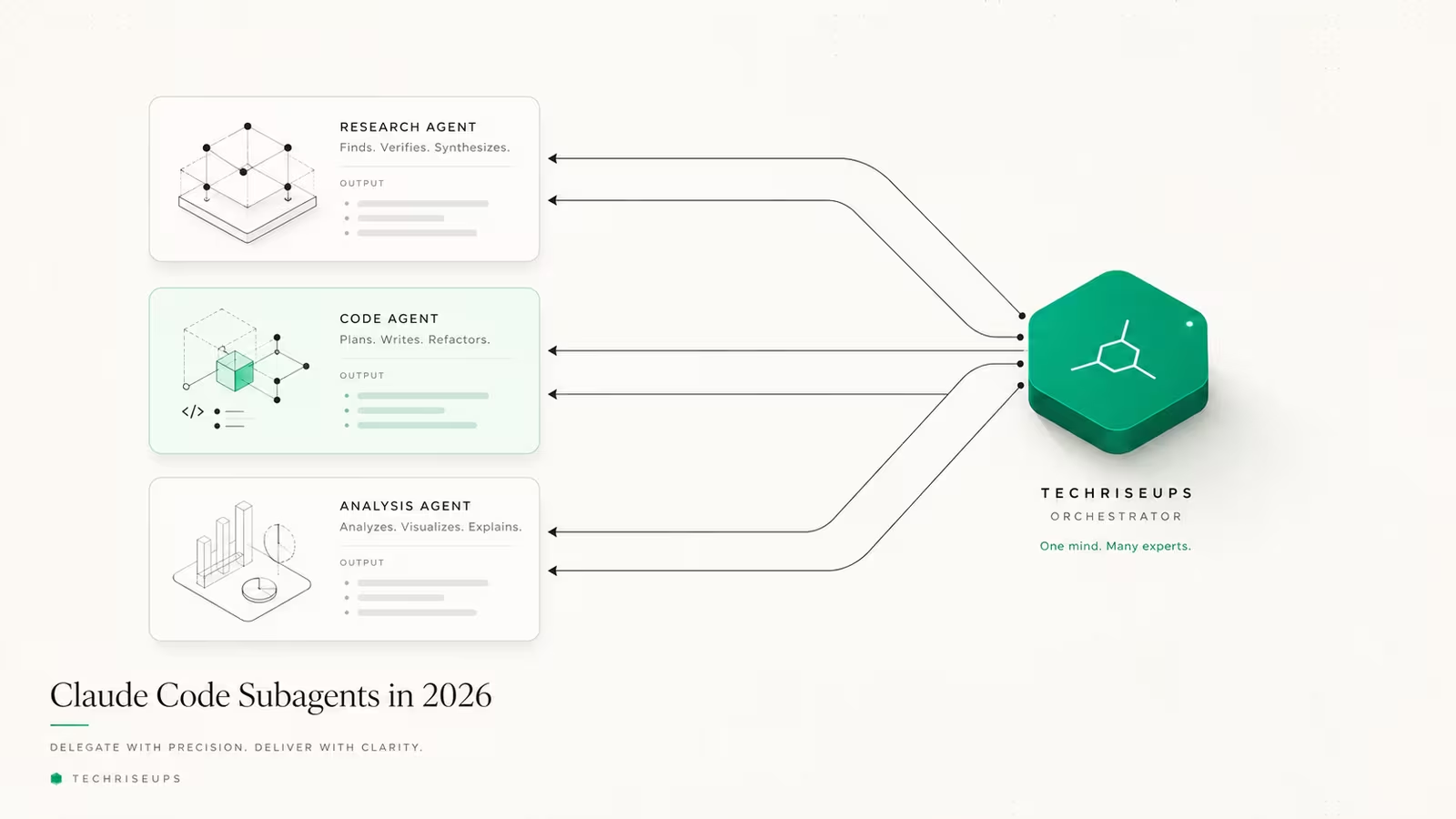
Claude Code subagents are specialized, isolated Claude instances your main session can hand a bounded task to — a codebase search, a review, a batch of file reads — so that work runs in its own context window and only the summary comes back. They exist to fix one problem: a long session slowly fills with logs and file dumps you'll never look at again, and answer quality drifts as it does. A subagent does the noisy work somewhere else and keeps your main conversation clean. This guide covers what Claude Code subagents are, how to build one, the three built-in types, how they differ from Skills and agent teams, and the part most tutorials skip: when they aren't worth the token cost.
What is a Claude Code subagent?
A subagent is a named, isolated Claude instance with its own system prompt, its own context window, its own tool access, and its own permissions. You define one as a Markdown file with YAML frontmatter, and Claude Code reads the description field to decide when to delegate to it. When a task matches, the subagent runs on its own, then returns a short result to the parent — the parent never sees the intermediate searches or logs. That isolation is the whole point: the official Anthropic docs frame subagents as the answer to a side task that would otherwise "flood your main conversation with search results, logs, or file contents you won't reference again." Each delegated task gets a fresh context budget, which is why practitioners describe subagents as a fix for the context rot that compounds over long sessions.
How do you create a Claude Code subagent?
A subagent is just a Markdown file with YAML frontmatter, saved in one of two places: .claude/agents/ (project-scoped, check it into git so your team shares it) or ~/.claude/agents/ (user-scoped, available in every project on your machine). When a name collides, the definition closest to your working directory wins, and project subagents take precedence over user ones. Only name and description are required; everything else is optional. A minimal reviewer looks like this:
---
name: code-reviewer
description: Expert code reviewer. Use proactively after code changes.
tools: Read, Grep, Glob
model: haiku
---
You are a senior code reviewer. Review the diff for bugs, security
issues, and unclear naming. Return a short, specific list of findings.
The frontmatter fields that matter most, per the official reference:
| Field | Required | What it does |
|---|---|---|
name | Yes | Lowercase-hyphen identifier used to invoke the subagent |
description | Yes | Tells Claude when to delegate — write it like a routing rule |
tools | No | Whitelist of tools; inherits all tools if omitted |
disallowedTools | No | Removes specific tools from the inherited set |
model | No | haiku, sonnet, opus, fable, a full model ID, or inherit (the default) |
permissionMode | No | default, acceptEdits, plan, dontAsk, and others |
By default a subagent inherits every tool your main session has, including any MCP server tools, so the tools and disallowedTools fields exist to narrow that set — a read-only reviewer with tools: Read, Grep, Glob physically cannot edit files. Note that /agents no longer opens an interactive wizard in current versions — you write the file yourself or ask Claude to write it, and Claude Code hot-reloads the change within a few seconds. The description is the single field worth obsessing over: it is what the orchestrator matches against, so "Use proactively after code changes" gets invoked far more reliably than a vague "reviews code."
What are the three built-in subagents?
You get three subagents before you write any of your own, and Claude routes to them automatically:
- Explore — read-only file discovery and codebase search. It reads excerpts to locate things, then hands back a summary. On recent versions it inherits your session's model (capped at Opus on the Claude API) rather than always running on Haiku, though you can override that by defining your own
Explorewithmodel: haiku. - Plan — gathers context and drafts a strategy before you commit to changes, used in plan mode.
- general-purpose — handles tasks that mix exploration and modification when neither of the above fits.
Automatic routing is convenient but, as one detailed writeup notes, the selection "is imperfect in practice" — if you want a specific subagent, name it explicitly ("use the code-reviewer subagent"). The built-ins cover most one-off delegation; you only need custom subagents when you keep spawning the same kind of worker with the same instructions.
Subagents vs Skills, slash commands, and agent teams
These four features overlap enough to confuse people, and the distinction is really about context. A subagent runs work in a separate window. A Skill injects instructions and files into the current window. A slash command is a saved prompt you trigger by hand. Agent teams are multiple full sessions running in parallel.
| Feature | Runs in | Best for | Isolates context? |
|---|---|---|---|
| Subagent | Its own context window | Bounded research, review, delegation | Yes |
| Skill | The main conversation | Reusable know-how and reference files | No |
| Slash command | The main conversation | A canned prompt you invoke manually | No |
| Agent team | Separate parallel sessions | Long independent workstreams | Yes (per session) |
Rule of thumb: reach for a subagent when the output matters but the process is noise you don't want in your main thread. Reach for a Skill when you want the model to keep the know-how in front of it — the same logic behind writing a good AGENTS.md file.
When do Claude Code subagents actually pay off?
This is where most tutorials go quiet. Subagents are not free — delegation copies context, and multi-agent workflows reportedly burn roughly 4–7x the tokens of a single session, with full agent teams closer to 15x. On the Claude Code Max plan much of that is cached reads at a lower rate, which softens the bill, but the multiplier is real.
They pay off for read-heavy, bounded tasks with a clean output: "find every call site of this function," "summarize this subsystem," "validate that this change didn't break the schema." Running two or three focused research subagents in parallel and letting the main session synthesize keeps your context clean while cutting wall-clock time. They don't pay off for parallel coding tasks with shared dependencies, or when a capable model delegates out of habit — a direct edit is often faster and cheaper than spinning up a worker to do it. If a task fits in your main window and you'll reference its output as you go, a subagent is usually the wrong tool.
What are nested subagents?
As of Claude Code v2.1.172 (June 10, 2026), subagents can spawn their own subagents, up to five levels deep — a lead-architect subagent can delegate to module-level workers, which delegate again. It mirrors how a real engineering team decomposes work, but the token math compounds hard: each level gets its own context window, so every nested call adds roughly 30–60% more tokens, and that overhead stacks quickly the deeper the chain goes. The five-level cap is a stack limit, not a target — most useful chains live at depth two or three. The standard cost-control pattern is to route by model as you descend: a stronger model at the root for planning, then cheaper, faster models at the leaves that do the bulk reading. Nesting is powerful for genuinely hierarchical work and wasteful for everything else.
How we use subagents at TechRiseUps
We build and run this site with Claude Code, so subagents aren't theoretical here. Our automated publishing pipeline uses a fresh-eyes reviewer subagent as a hard gate: after a draft is written, a separate agent with its own context scores it against a rubric and returns a PASS / FIX / FAIL verdict before anything publishes. Running the review in an isolated window matters — it never sees the writer's reasoning, so it reviews the article a reader would actually get, not the intent behind it. We also lean on read-only research agents to gather sources without cluttering the main thread. The honest caveat that matches the cost analysis above: we reserve delegation for bounded, well-defined steps. For quick edits we skip it, because the overhead isn't worth it.
Frequently asked questions
What's the difference between a Claude Code subagent and a Skill? A subagent runs a task in its own isolated context window and reports back a summary; a Skill injects instructions and reference files into your current conversation. Use a subagent to keep noisy work out of your main thread, and a Skill to keep useful know-how in front of the model.
Do subagents cost more tokens? Yes. Delegation copies context into a new window, so multi-agent runs are commonly cited at 4–7x the tokens of a single session, and nested chains multiply further. On plans where most of that is cached reads the effective cost is lower, but subagents are an efficiency tool for context, not for token spend.
Where are Claude Code subagents stored?
In .claude/agents/ for project-scoped subagents (shareable via git) or ~/.claude/agents/ for personal ones available across all your projects. Both are scanned recursively, and the definition closest to your working directory wins on a name collision.
Can a subagent call another subagent? Yes, since v2.1.172 subagents can nest up to five levels deep, though most practical workflows stay at two or three levels because token cost compounds with each layer.
Can I choose which model a subagent uses?
Yes — set the model field to haiku, sonnet, opus, fable, a full model ID, or inherit. Routing cheap models like Haiku to read-heavy subagents is the main way people keep multi-agent costs down.
Sources
- Anthropic — Create custom subagents (official docs): definition, frontmatter fields, file locations, built-in types, and invocation.
- ksred.com — Claude Code Agents & Subagents: What They Actually Unlock: context isolation, the three built-in types, and the token-cost multipliers.
- ofox.ai — Claude Code Nested Sub-Agents: 5 Levels Deep, Token Math: the v2.1.172 nesting release, depth limits, and compounding token cost.
Some links may earn us a commission at no extra cost to you.

Waqas Ahmed Waseer
Waqas Ahmed Waseer is a developer and automation builder with 8+ years shipping production systems used by 100k+ people. He builds custom multi-tenant SaaS, AI automation (n8n, LLM workflows, WhatsApp bots) and hosting infrastructure (WHM/cPanel, CloudLinux) — and is the maker of WaSphere, FlowMaticX, and the WaseerHost hosting brand. 100+ projects delivered for SMBs, agencies and funded startups.